PebbleSpaces
Booking system app
PebbleSpaces came to us with a half-built prototype and six weeks before customers would start using it. We got the first location open, then rebuilt the product around what happened in the real world.
- Next.js
- TypeScript
- Node.js
- PostgreSQL
the stakes
A bug here puts a paying customer on the wrong side of a locked door.
On a screen, PebbleSpaces looked like a booking app. In the room, it also had to take payment, unlock the right door, know whether the pod was occupied, and give staff a way to step in when hardware stopped responding.
A bad occupancy signal could show a pod as available when it wasn't. If a lock or router went offline, staff needed to know before a customer showed up.
The first location was scheduled to open in six weeks.
- Domain
- PropTech
- Stage
- Prototype launch, then full rebuild
- Engagement
- Launch · rebuild · ongoing support
the process
The decisions made


overview
Stabilize the prototype we had. Rebuild it after launch.
We knew almost immediately that the inherited codebase needed to be rebuilt. There just wasn't enough time to do it before launch.
So we kept working in code we planned to replace and focused on what customers and staff would actually use. Customers needed to book, pay, get through the door, and start a session. Staff needed to manage occupancy and handle problems from the admin side. Everything else had to wait.
Spending weeks on work we knew we'd redo was a challenge. Spending months rebuilding before a single real booking came through would've been even harder. We opened the doors and watched people use the product. By the time we rebuilt it, we knew which problems were real.
01 Get the doors open
Get the first location ready for real customers
Customers needed to book, pay, and unlock the right door. Staff needed to set up spaces, manage occupancy, and keep live sessions running. We fixed those pieces in the prototype we had.
Deployment and production QA were part of that work. A successful checkout meant nothing if the customer arrived and the door stayed locked. Anything that could cause that got fixed first.
02 Rebuild around real use
Turn the prototype into something the business could run
After launch, we finally had real bookings to learn from. We rebuilt the product around how PebbleSpaces actually worked: locations, pods, live sessions, device status, and the work happening behind the scenes to keep them in sync.
When a payment went through, the door, the session clock, and the admin screen all had to know about it. The rebuild gave the team one place to see what was happening and clearer ways to fix it when something went wrong.
03 Move beyond the first location
The pods started moving. The QR codes had to keep up.
PebbleSpaces started using pods across multiple locations and temporary events. That made the QR code on each pod more than a sticker. It had to keep the right pod connected to the right location, booking flow, and device wherever it went.
Operators also needed to know when a lock, power relay, or occupancy sensor went offline before a customer found out the hard way. We built the tools to check that status remotely and handle the support work around it.
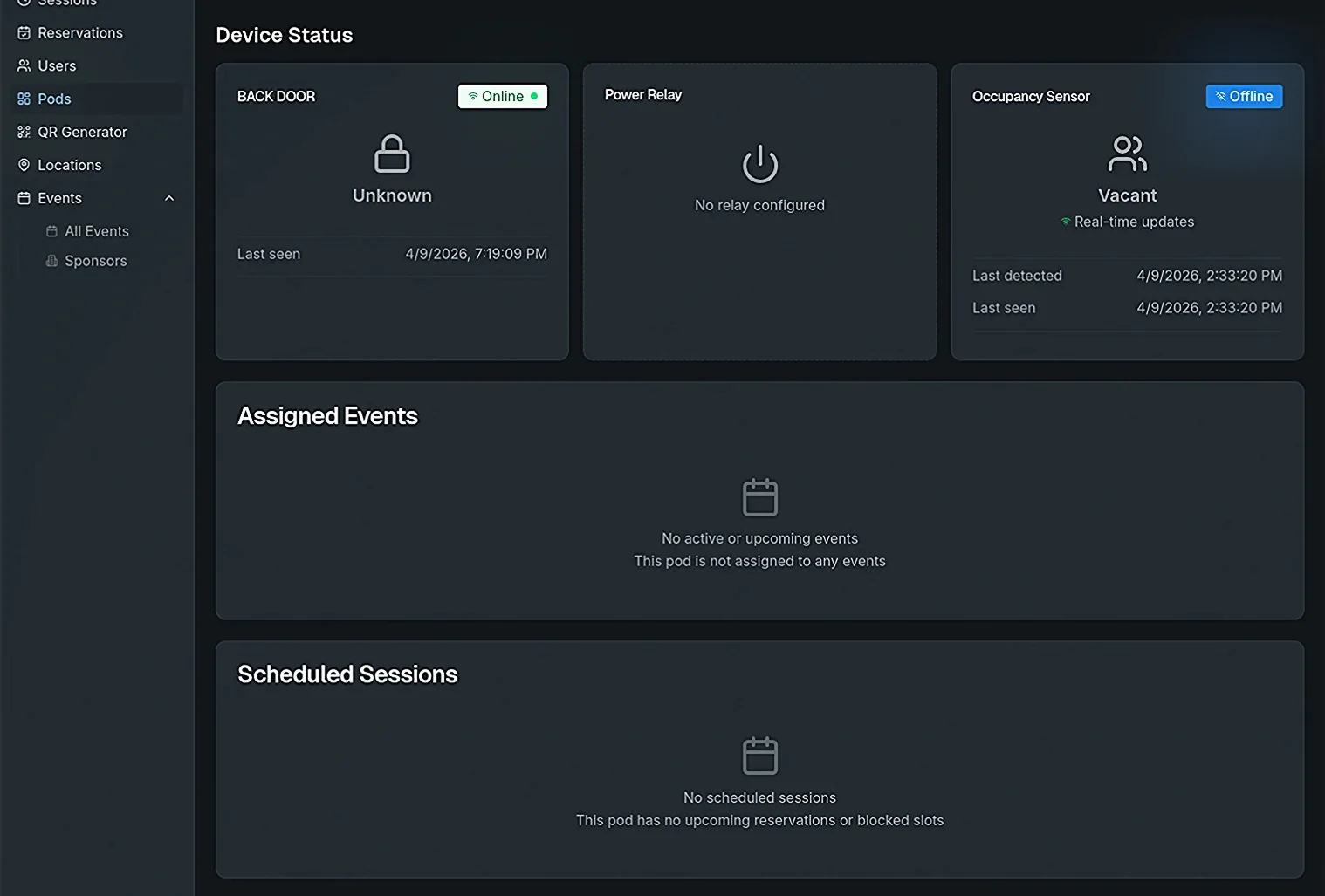
Lock, power, and occupancy status for a single pod. 04 Keep the context
PebbleSpaces kept changing after the rebuild
We stayed involved for architecture reviews, security work, and the next round of technical decisions. Because we already knew the system, a new question could start with the decision instead of a long re-explanation of the product.
the system
The software had to agree with the room.
A paid booking, an unlocked door, an active session, and an occupied pod couldn't drift into four different versions of the truth.
what we built
Booking and payment flow
Access-system integration
Occupancy and session state
Admin operations
Event and location tooling
Support and recovery workflows
what it has to get right
Money
Access control
Devices
Identity
Recovery
the outcome
The proof
- Door unlock response
- ≈200msFast enough that a customer wasn't left wondering whether the tap worked.
- Occupancy signal response
- ≈100msThe app updated almost as soon as the sensor reported a change.
- Longest single booking
- 6+ hoursReal customers used the pods for much more than quick calls.
- Use type
- Business travelers took 5 AM meetings in the pods. Musicians recorded late at night. One Comic-Con YouTuber with more than 250K subscribers booked an 11 PM session.
- The need
- People needed privacy at odd hours, and the door had to open when they got there.
"Dom worked flawlessly with the other vendors, even when they made it more difficult than it needed to be."
next up